
Documentationv2.0Start Free
Product
Skill Builder
A skill is a packaged capability. A name, a trigger that tells the AI when to load it, instructions that tell it what to do, and guardrails that say what it must never do. Build one when you have a process worth running the same way every time.
When to build a skill
Skills sit between prompts and agents. Pick the right shape before you start.
Use a prompt
One-off task. You paste it in, get an answer, move on. No reuse, no guardrails needed.
Build a skill
Repeatable process. Same steps every time. Loads only when the task matches the trigger.
Build an agent
A persistent identity — a reviewer, a writer, a planner — that you hand a task to.
The four steps
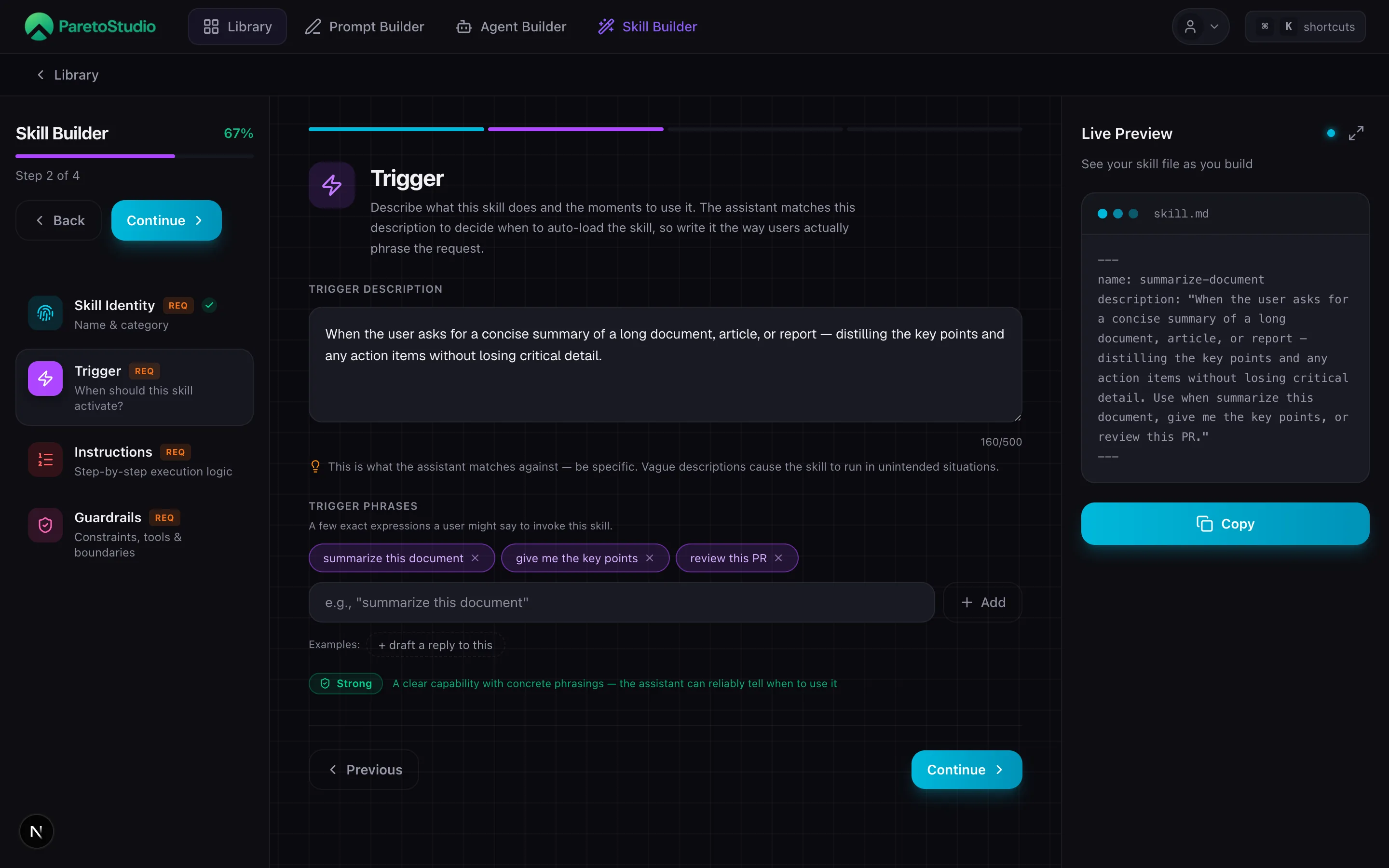
Each step is a single decision. The Live Preview updates your SKILL.md on the right as you go — what you read is what installs.
- Step 1·
Skill Identity
ReqName & category
Name the skill (snake_case, used as the folder name) and categorize it. The internal name is how the skill is referenced when installed; pick something stable.
- Step 2·
Trigger
ReqWhen should this skill activate?
Define when this skill fires. Write a clear description of what it does and the moments to use it, plus a few exact phrasings a user might say. Aim for the green "Strong" quality badge.
- Step 3·
Instructions
ReqStep-by-step execution logic
What the skill does once it loads. Guided mode forces discrete steps (if you cannot break it into steps, the skill is probably too broad); Freeform is better for nuanced logic. Use $ARGUMENTS for dynamic values.
- Step 4·
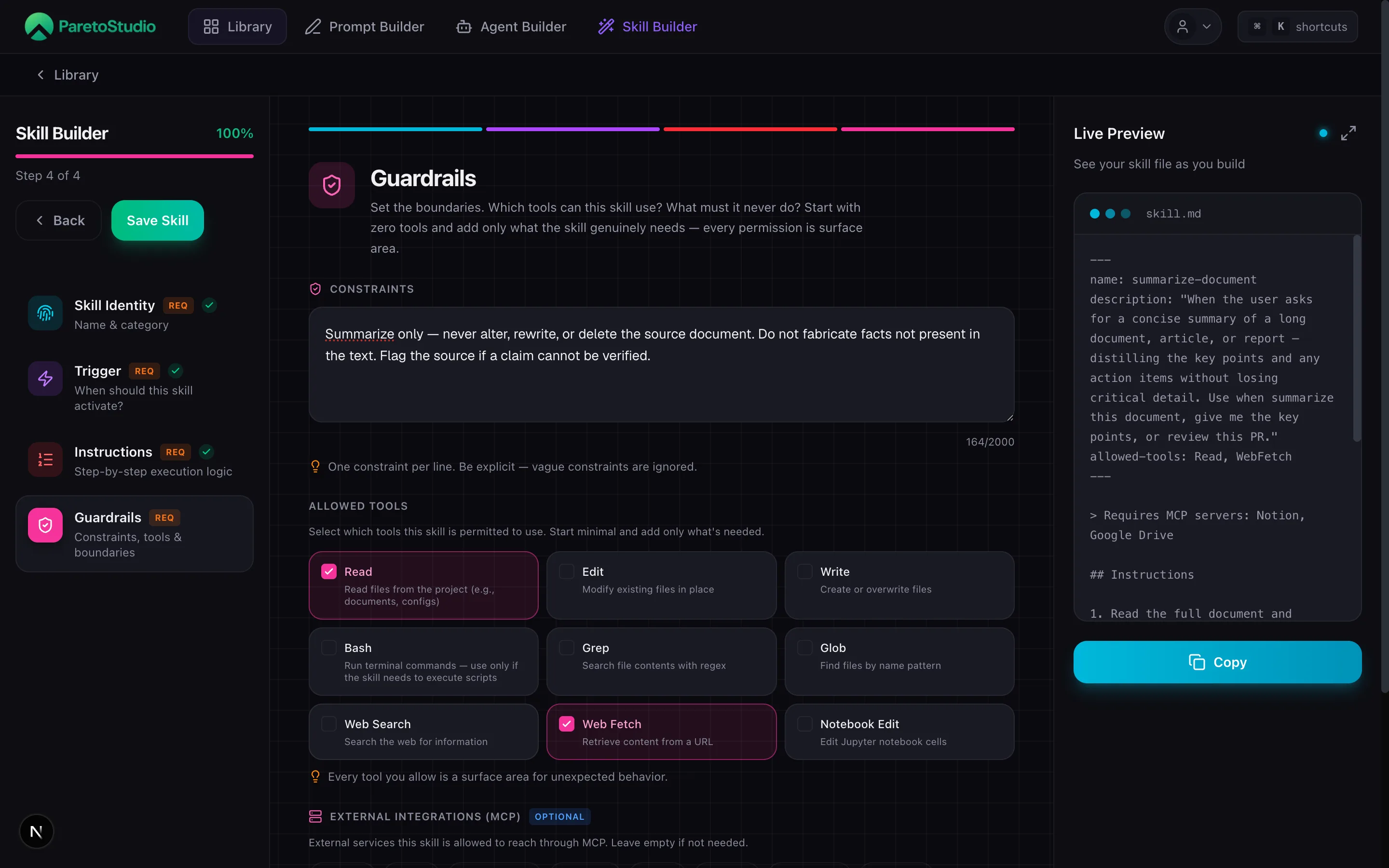
Guardrails
Constraints, tools & boundaries
Scope the blast radius. Which tools can this skill use (Read, Edit, Write, Bash, WebSearch, WebFetch, …)? What must it never do? Start with zero tools and add only what the skill genuinely needs.
Live Preview and autosave
Prompt, Agent, and Skill Builder use the same preview workspace. The file on the right is the generated artifact, not a simplified example: it updates while you type and stays readable as the document grows.
Follow the active step
The section controlled by the current step is marked in ParetoStudio green. The preview scrolls to it automatically while keeping one font size and viewport across all three builders.
Inspect or copy the file
Expand the preview for a larger view or copy the complete SKILL.md. The compact and expanded views show the same generated content.
Drafts save as you work
Meaningful edits are protected locally immediately and synced to a draft after a short pause. Adding the draft ID to the URL does not interrupt your work.
The exit warning appears only when you leave
You can type, change steps, expand the preview, and let autosave update the URL without a confirmation dialog. ParetoStudio warns you only when unsaved work could be lost by leaving, reloading, or closing the builder.
Anatomy of a skill
Every skill is a small, self-contained package. These are the fields you fill in the builder — and what each one does at runtime.
name | Short identifier used in the UI and as the folder name (snake_case). | Required |
description | One or two sentences that tell Claude when to load the skill. This text is the trigger. | Required |
instructions | The body of the skill — what Claude should do once it loads the skill. | Required |
bundled files | Reference material, examples, or scripts the skill can read on demand. | Optional |
The description is the trigger
Claude decides whether to load a skill by reading its description — not its name, not its instructions. A vague description means the skill will trigger on the wrong tasks, or not at all. Write the description last, once you know exactly what the skill does.
Writing the instructions
The instructions are a short document the AI reads top to bottom when the skill loads. Treat them like a runbook for a new teammate.
| Imperative voice | Verbs, not hedges. “Read the diff. List every new function.” Not “You should probably look at…” |
| Explain the why | One clause of rationale per rule. Models follow rules they understand — not rules they obey. |
| Go light on MUSTs | Reserve ALL-CAPS for the two or three things that genuinely break the workflow. Overuse turns them into background noise. |
| Progressive disclosure | Keep the main file short. Put long references, templates, and examples in bundled files the skill loads only when needed. |
The builder enforces none of this — it is your call. But instructions that read like a checklist consistently outperform instructions that read like a memo.
Testing a skill
Once you save a skill to your library, try it in the place you actually work. Read the description out loud and ask something that should match it — that is the cheapest way to see if the trigger wording is right.
Install via MCP
“Install my pr-review skill into this project.”
What the AI does behind the scenes
install_skill({ skill_id: "...", path: "./" })Use in Claude Code
“Review this PR and flag anything risky.”
What the AI does behind the scenes
Claude reads the skill description, decides it matches, and loads the instructions.Use in the Chrome Extension
“Audit the copy on this page for tone consistency.”
What the AI does behind the scenes
The extension matches the request against your installed skills and runs the best fit.Limits
Free accounts can create up to 2 skills. Pro removes the cap.
| Plan | Builder access | MCP tools |
|---|---|---|
| Free | Up to 2 skills | list_skills, get_skill, search_skills, install_skill, create_skill (capped at 2) |
| ProRecommended | Full builder · unlimited saves | + update_skill, delete_skill (unlimited) |
Free includes 2 skills
Free accounts can build and install up to 2 skills via
create_skill. See the MCP Server guide for the full tool list. Upgrade to Pro for unlimited skills.Troubleshooting
Skill never triggers
Claude picks skills by reading the
description. If it never loads, the description is too abstract. Rewrite it with the exact words a user would say when they want this skill — “review a pull request”, not “code quality assistant”.Skill triggers for the wrong tasks
The description is too broad. Add the boundary explicitly: what the skill is for and what it is not for. A line like “Use when reviewing an existing PR. Do not use for writing new code”stops most false positives.
Skill loads but does the wrong thing
Claude loaded the skill but the instructions are vague. Replace adjectives with steps. “Be thorough” is not a step. “Read the diff, then list every new function without a matching test” is.
install_skill fails from my IDE
Check that your MCP server is connected and your API key is set in the
env block of the client config. The full setup is in the MCP Server guide.